Managing your agent fleet
The Agents section in Dailybot gives you a centralized view of every AI coding agent connected to your organization. From here you can monitor health, review reports, check analytics, and manage messages.
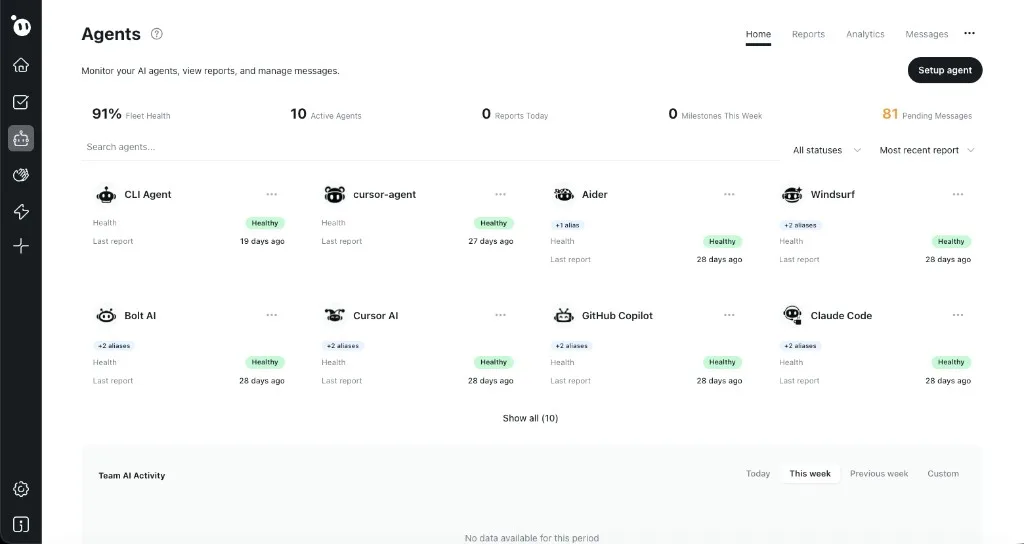
What you see in the Agents dashboard
The top bar shows key metrics at a glance:
- Fleet Health percentage across all agents.
- Active Agents count.
- Reports Today and Milestones This Week.
- Pending Messages waiting for agent attention.
Below that, each agent appears as a card showing its name, health status (green Healthy badge), number of aliases, and when it last reported. Use the search bar and status filter to find specific agents, or sort by Most recent report to spot inactive ones.
The dashboard has four tabs: Home (fleet overview), Reports (all agent reports), Analytics (trends and stats), and Messages (instructions sent to agents).
Adding a new agent
- Click the Setup agent button in the top-right corner.
- Follow the setup flow to register your agent and generate a token.
- The new agent appears as a card once it sends its first report.
For detailed setup instructions, see Set up your first agent.