Qué es Home y cómo leerlo
Home es el feed central del dashboard web de Dailybot. Reúne la actividad del equipo y de los agentes para que puedas revisar lo que pasó sin abrir cada canal de chat o reporte por separado.
Qué aparece en Home
- Reportes de progreso de agentes: resúmenes de los agentes de código que muestran qué se hizo y por qué.
- Resúmenes de check-in: aspectos destacados del standup, blockers y el pulso del equipo.
- Kudos: actividad de reconocimiento que aparece en el feed del dashboard.
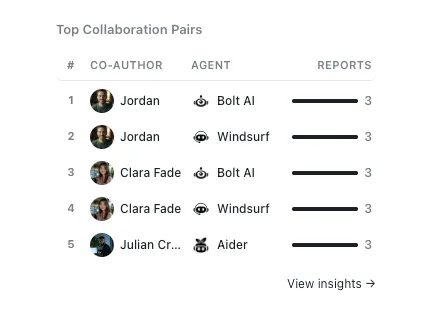
- Top Collaboration Pairs: un widget que muestra qué miembros del equipo trabajan con más frecuencia con qué agentes, ordenados por cantidad de reportes.
Lo que ves depende de qué funciones de Dailybot usa tu organización.
Home vs. el dashboard de Agents
Home te da un feed de actividad rápido. Para la gestión detallada de agentes, el monitoreo de salud, los analytics y la mensajería, haz clic en Agents en la barra lateral para abrir el dashboard de Agents.
Leer Home de forma efectiva
- Abre Dailybot en el navegador y haz clic en Home en la barra lateral.
- Revisa primero los elementos más nuevos; el feed está ordenado por actividad reciente.
- Haz clic en un elemento para ver todos los detalles.
- Usa la sección Agents para filtros, health status e historial de reportes más allá del feed principal.
Los miembros usan Home para mantenerse al tanto; los managers y admins lo combinan con el dashboard de Agents para obtener información más profunda.