Invite members from Discord
Invite people from your Discord server into Dailybot so standups, kudos, and automations run against the same people you already collaborate with.
Before you begin
- You need Organization admin or Team manager permissions.
- Dailybot must be added to the Discord server you are inviting from.
Steps
- Open the Dailybot web dashboard and sign in.
- Click Settings in the sidebar, then select Members.
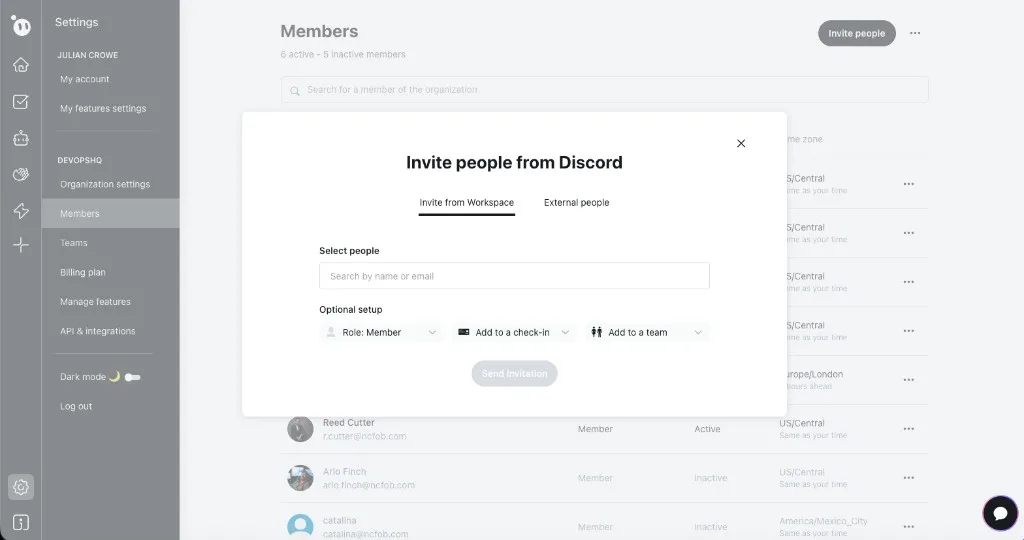
- Click the Invite people button in the top-right corner.
- In the Invite people from Discord dialog, choose the Invite from Workspace tab to see people already in your Discord server, or switch to External people to invite by email.
- Search by name or email to find the people you want to add.
- Under Optional setup, choose a Role (Member by default), optionally assign them to a check-in, and optionally add them to a team.
- Click Send invitation.
- If someone does not appear in the search, confirm they are in the connected Discord server and that the Dailybot bot has the required permissions.
What to expect after
Invitees get a prompt to link Discord to your Dailybot org. That may appear as a DM from Dailybot, a message in a channel, or a browser authorization step. After they finish, they can use Dailybot commands and features in Discord and appear on the Members page.